Computer Dust Removal: 7 Signs Your PC Is Begging for Emergency Cleaning
Is your computer roaring like a jet on takeoff? Does your laptop become scorching hot after just 30 minutes of use? These symptoms aren’t trivial: your machine is sending you an alarm signal. Computer dust removal is one of the most neglected maintenance tasks by users, yet it’s the one that can literally save your PC from a premature death. At TechAuPoint in Longueuil, we see computers destroyed every week by a simple lack of preventive care.
In this article, we’ll explain why dust is the number one enemy of your hardware, how to recognize the 7 critical warning signs, and why professional PC physical cleaning is an investment that can save you hundreds of dollars.
Why Dust Destroys Your Computer
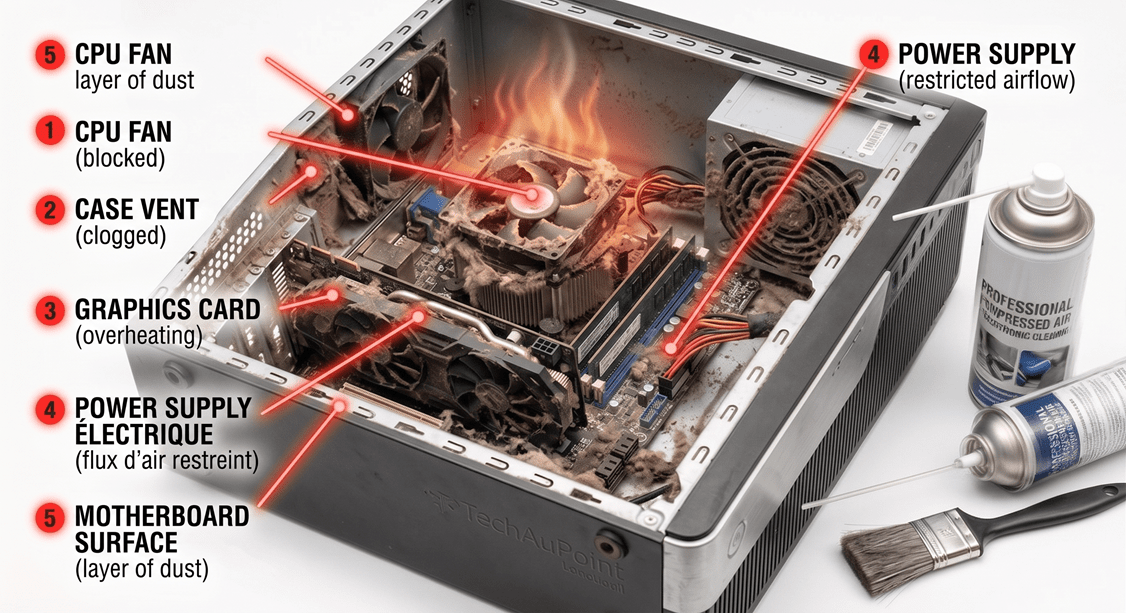
Dust is much more than an aesthetic issue. Inside your PC, it accumulates on fans, heatsinks, and electronic components. Over time, this buildup creates a literal thermal blanket that prevents heat from escaping properly.
The Thermal Snowball Effect
When heat can no longer escape, your components heat up. The processor (CPU) and graphics card (GPU) are designed to operate between 40°C and 70°C. Above 85°C, you enter the red zone. At 95°C+, it’s emergency shutdown or worse, permanent damage.
Quebec’s Climate Makes Things Worse
On the South Shore, our seasonal changes and forced-air heating systems increase airborne dust in our homes. Pet owners and smokers see their computers clog up even faster. According to an Intel study on processor thermals, dust accumulation can reduce a CPU’s lifespan by over 40%.
The 7 Critical Signs Your PC Needs Computer Dust Removal
1. The “Jet Takeoff” Sound
Are your fans running at full speed even when you’re just browsing the web? That’s the first sign. To dissipate heat, your fans speed up. If the noise becomes constant, it means airflow is blocked by dust.
2. Excessive Heat Under Your Laptop
If the bottom of your laptop becomes burning hot to the point you can no longer place it on your lap, you’re experiencing serious laptop overheating. Laptops are particularly vulnerable because their ventilation systems are compact and easily obstructed.
3. Unexplained Slowdowns (Thermal Throttling)
Was your PC fast 6 months ago but now slow for no apparent reason? It’s probably “thermal throttling.” To protect itself, your processor voluntarily reduces its power to lower its temperature. Result: performance cut in half or even thirds.
4. Sudden Shutdowns and Restarts
Does your computer turn off by itself in the middle of a task? It’s not a software bug: it’s the ultimate protection mechanism kicking in to prevent component destruction. If this happens regularly, your PC is begging you to act.
5. Random Blue Screens and Crashes
The infamous BSOD (Blue Screen of Death) on Windows can have many causes, but overheating is one of the most common. Before reinstalling Windows or replacing parts, a simple PC physical cleaning often solves the problem.
6. The Smell of Heat or Burning
This is the absolute emergency sign. If you smell hot plastic or burning coming from your PC, turn it off immediately and unplug it. Don’t turn it back on until a technician has inspected it.
7. Performance Drops During Gaming
Gamers are the first to notice the problem. If your FPS drops dramatically after 15-20 minutes of play, it’s almost always a thermal issue. A good computer dust removal Longueuil service often restores all of a machine’s performance.
Why DIY is a Bad Idea
There are many YouTube tutorials explaining how to dust your computer with a can of compressed air. In theory, it’s doable. In practice, here are the mistakes that cost a lot:
The Free-Spinning Fan Trap
If you blow compressed air on a fan without physically blocking it, it will spin at extreme speeds (well beyond its rated speed). Result: the ball bearings get destroyed and your fan becomes noisy or stops working entirely.
Static Electricity: The Silent Killer
Without an antistatic wristband, simple friction can generate an invisible discharge that damages RAM, the motherboard, or the SSD. The worst part? The component may appear to work for weeks before dying.
The Forgotten Thermal Paste
Nobody talks about this in tutorials: the thermal paste between your processor and its heatsink hardens over time (2-3 years on average). Even a perfectly dust-free PC will continue to overheat if the thermal paste is dry. That’s why our service systematically includes its replacement.
Our Dust Removal Service at TechAuPoint
At TechAuPoint, our dust removal service at $29 includes:
- Complete and safe disassembly of your PC or laptop
- Professional cleaning with antistatic tools and controlled air blowing
- Visual inspection of all critical components
- Thermal paste replacement with premium quality product
- Post-service temperature testing to validate effectiveness
- Preventive diagnosis of other components
Our equipment includes filtered air compressors, antistatic brushes, and infrared thermometers to precisely measure temperatures before and after. For more complex cases, we also offer a complete computer diagnostic starting at $29.
Why Choose a Local South Shore Service?
Computer maintenance South Shore at TechAuPoint means over 10 years of experience and more than 5,000 computers repaired. Our A+ and CISCO certified technicians know all brands: ASUS, Dell, HP, Lenovo, Acer, MSI, Alienware. If you live in Saint-Hubert, Brossard or anywhere else on the South Shore, our shop at 4172 Grande Allée is easily accessible.
For those who prefer not to travel, we also offer an in-home service anywhere on the South Shore.
How Often Should You Get a Dust Removal?
Here are our recommendations based on field experience:
- Standard desktop PC: Once a year
- Gaming PC or Workstation: Every 6 to 8 months
- Daily-use laptop: Once a year
- Dusty environment or pets: Every 4 to 6 months
- Smoker’s home: Every 3 to 4 months (nicotine sticks particles)
A $29 investment per year can literally double the useful life of your computer. Compared to the cost of a new motherboard ($200+) or a new PC ($1000+), it’s the most cost-effective maintenance in the entire computing ecosystem.
Conclusion: Act Before It’s Too Late
Dust works silently, day after day, to destroy your computer hardware. The warning signs are there: excessive noise, heat, slowdowns, crashes. Ignoring these symptoms means accepting to replace your PC much sooner than necessary.
Computer dust removal is the most accessible and cost-effective preventive maintenance you can offer your machine. At TechAuPoint in Longueuil, we transform this intervention into a fast, transparent, and affordable service.
Visit us at 4172 Grande Allée in Longueuil, or contact us to schedule an appointment. Your computer will thank you.
FAQ – Frequently Asked Questions About Computer Dust Removal
How long does a computer dust removal take at TechAuPoint?
The majority of our dust removals are completed the same day, generally in less than 15 minutes. For complex Gaming PCs or laptops requiring complete disassembly, plan sometimes 2 hours. We’ll call you as soon as your device is ready.
Can dust removal really improve my PC’s performance?
Absolutely. An overheating PC voluntarily reduces its power to protect itself (thermal throttling). After a dust removal and thermal paste change, it’s not uncommon to see a 20% to 40% performance gain, especially on gaming laptops or PCs over 2 years old.
Is it dangerous to use a compressed air can myself?
Yes, if you don’t take the necessary precautions. Blowing on fans without blocking them damages their bearings. Also, without antistatic protection, you risk damaging sensitive components. A professional $29 dust removal is more economical than replacing a motherboard.
My laptop is very noisy, is it necessarily dust?
In 80% of the cases we see, yes. However, noise can also come from a defective fan bearing or a hard drive at end of life. That’s why our service includes a complete diagnosis to identify the exact cause.
Do you offer an in-home dust removal service?
Yes, as part of our in-home service at $139, we can perform dust removal directly at your home on the South Shore. However, for deep cleaning with thermal paste replacement, we generally recommend bringing it to the shop for better results.