5 signs your computer needs an urgent physical cleaning
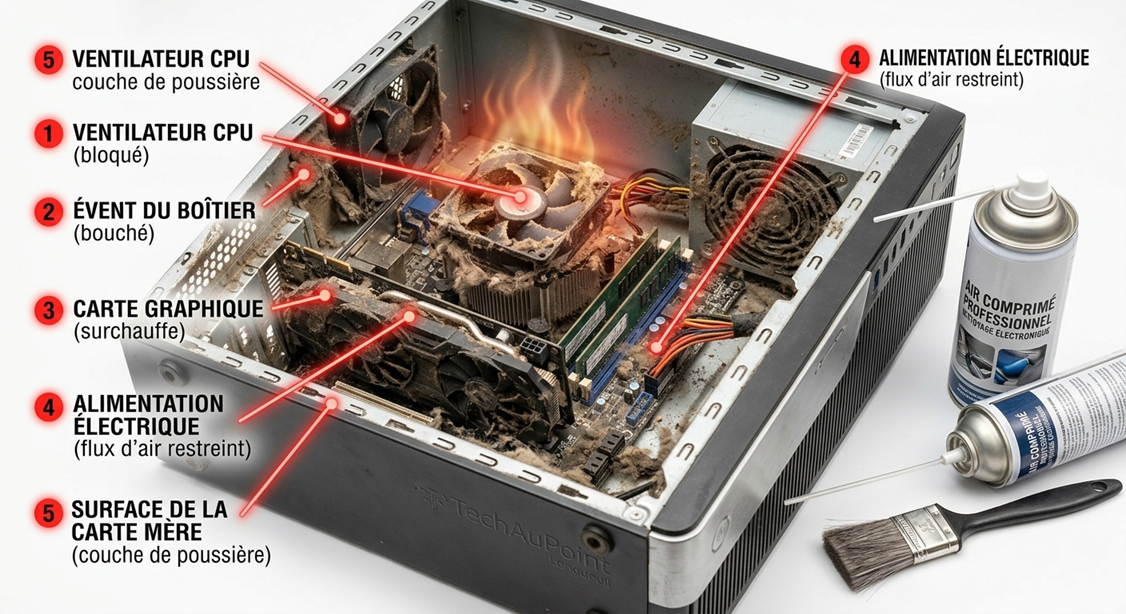
We rarely think about it, but dust is the number one enemy of computers. On the South Shore of Montreal, with our changing seasons, PC cooling fans work extra hard. If you ignore signs of overheating, you risk permanent damage to your motherboard or processor.
Here are the 5 warning signs you should never ignore:
- The “jet engine” noise : Your fans are running at full speed, even when you’re not doing anything demanding.
- Excessive heat : The bottom of your laptop becomes uncomfortably hot to the touch.
- Unexplained slowdowns : To protect itself from heat, your processor slows down automatically (thermal throttling).
- Sudden shutdowns : Your computer turns off without warning — this is an emergency safety mechanism.
- Burnt smell : If you notice a faint burning smell, shut down your computer immediately.
Why you shouldn’t do it yourself ? Using a can of compressed air without properly securing the fans can damage bearings or push dust deeper into sensitive components, making the problem worse.
Our TechAuPoint service : At TechAuPoint, we perform a complete internal cleaning, including thermal paste replacement (which hardens over time). This low-cost maintenance service can extend the life of your computer and save you from expensive repairs or replacement.